1. Overview
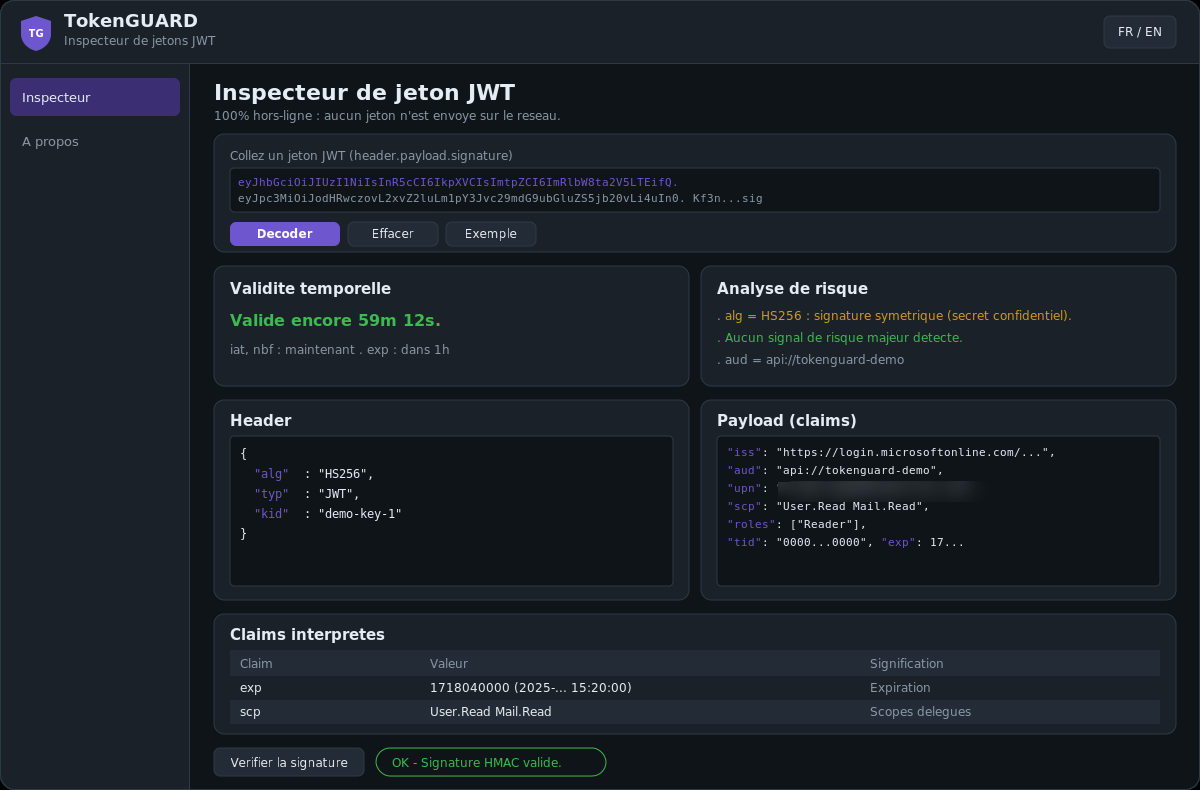
TokenGUARD is a free, fully offline JWT inspector. A JWT (JSON Web Token) is a bearer token
made of three Base64Url segments: header.payload.signature. TokenGUARD decodes the header and claims,
interprets the fields, flags risks and can verify the signature.
No token is ever sent over the network: all processing happens locally. It is a diagnostic tool for developers and IAM / M365 / Azure teams.
2. Installation
WPF .NET application (Windows). Self-contained, no external dependency.
- Open
TokenGUARD.csprojin Visual Studio (targetnet10.0-windows). - Build / run. No NuGet package or configuration required.
3. Usage
- Paste a token in the top box (a leading
Bearerprefix is accepted and stripped). - Click Decode.
- Sample inserts a demo token (HS256, Entra-like claims) and pre-fills the secret so you can test verification. Clear resets everything.
4. Reading the results
Header and Payload
Both JSON objects are shown pretty-printed. The header holds the algorithm (alg), type
(typ) and key id (kid). The payload holds the claims.
Interpreted claims
Each claim is listed with its value and meaning. Time fields (exp, nbf,
iat) are converted to readable dates.
Time validity
Colored summary: valid for ..., expired ... ago or not yet valid.
Risk analysis
Flags, for example: alg = none (unsigned token), symmetric HMAC, missing exp,
excessive lifetime, missing aud / iss, iat in the future.
5. Signature verification
Optional and offline. Provide the key material then click Verify signature:
| Algorithm | Key to provide |
|---|---|
| HS256 / HS384 / HS512 | The shared secret (text). |
| RS256 / RS384 / RS512, PS* | The public key in PEM (-----BEGIN PUBLIC KEY-----). |
| ES256 / ES384 | The ECDSA public key in PEM. |
Result: valid, invalid, or unsupported. HMAC comparison is constant-time.
6. Common Entra claims
| Claim | Meaning |
|---|---|
tid | Entra tenant |
oid | User/SP object id |
upn / preferred_username | Sign-in identifier |
scp | Delegated scopes (permissions in a user flow) |
roles | Application roles (app-only or app roles) |
appid / azp | Calling application |
amr | Authentication methods (e.g. pwd, mfa) |
ver | Token version (1.0 / 2.0) |
7. Privacy
TokenGUARD makes no network request. Pasted tokens, secrets and keys stay in local memory and are never saved or transmitted. Closing the app clears everything.
8. Troubleshooting
| Symptom | Hint |
|---|---|
| "Invalid JWT format" | The token must have 3 dot-separated segments. 5 segments = encrypted JWE (not decodable without the key). |
| "Invalid Base64Url" | The token was truncated on copy/paste; copy it in full. |
| HMAC signature invalid | Wrong secret, or the token is not signed with that secret. |
| RSA/ECDSA signature invalid | The public key does not match the signing private key (wrong kid). |